That "Gmail Zero-Day" Was Really a Fake Google Sheets Chrome Extension Reading Your Email. Here's How to Check Your PC in 2 Minutes
Researchers found the Remus infostealer's advertised Gmail "zero-day" is a malicious Chrome extension posing as Google Sheets that reads unread Gmail every minute. Here's how it works and exactly how to check Chrome and lock down your Google account.
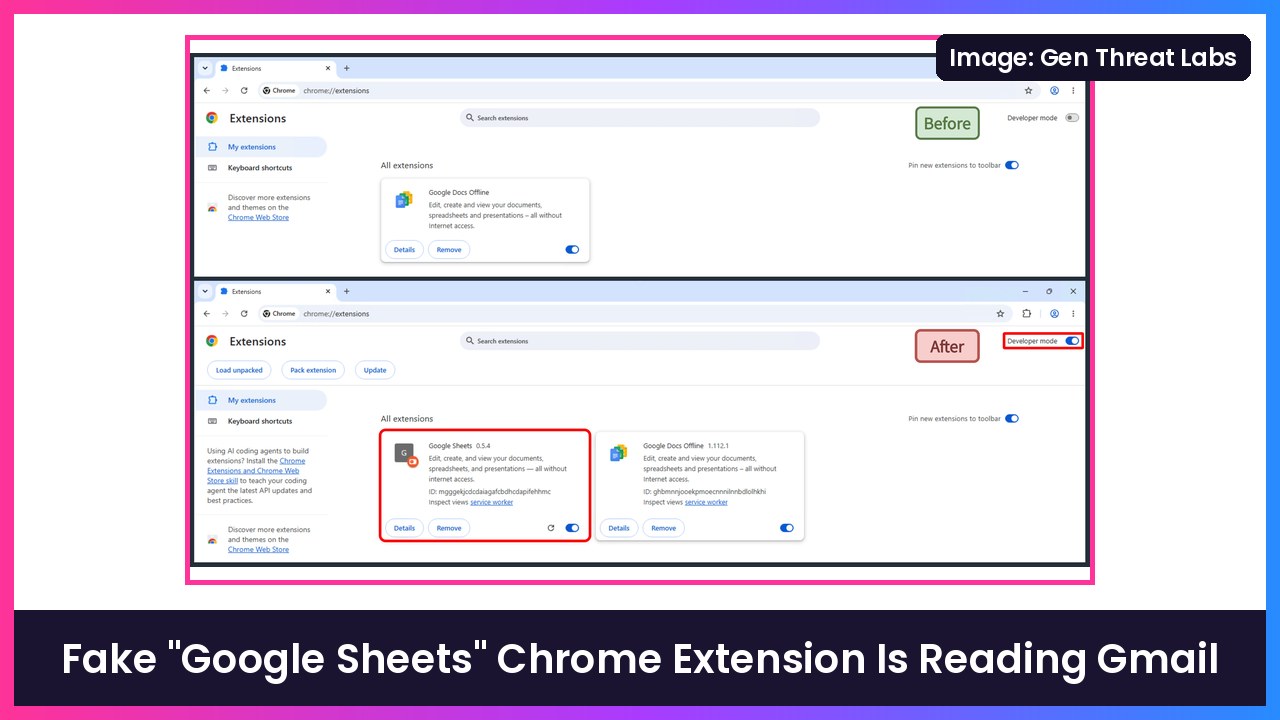
Quick summary: All right, guys, if you use Gmail in Chrome on a Windows PC, take two minutes for this one. The makers of an infostealer called Remus have been selling what they called a Gmail “zero-day” that could keep reading your email even after you change your password. Security researchers at Gen Threat Labs took it apart, and it’s not a Gmail flaw at all. It’s a malicious Chrome extension pretending to be “Google Sheets” that checks your unread Gmail every minute. The good news: it’s really easy to spot if you know where to look.
Key takeaways
- Not a Gmail bug: Gen Threat Labs found no zero-day. The “feature” is a fake Chrome extension called Google Sheets that uses your already signed-in Gmail session.
- How it gets there: Remus has to infect your Windows PC first. Then it quietly installs the extension into Chrome (the only browser it targets) and turns on Developer mode.
- What it steals: Every minute, it checks for unread email in up to 10 signed-in Gmail accounts and sends the sender, subject, message text and your email address to the attackers.
- Why a password change isn’t enough: Signing out stops it, but the extension stays installed, so it starts reading again as soon as you sign back in on that PC.
- The two tells: A “Google Sheets” extension you didn’t install (marked as unpacked) and Developer mode turned on at chrome://extensions.
What Remus actually does
According to Gen’s researchers, the Remus developers started advertising the Gmail feature on November 8, 2026, claiming it kept access to victims’ inboxes “even after the victim changes their password and revokes all sessions.” Malwarebytes says it was pitched as exclusive to Remus’s $1,000-a-month top tier.
Gen published its teardown on November 24, and Invoke RE independently found the same extension. Here’s how it works:
- Remus, already running on an infected Windows PC, downloads a module whose only job is to install a Chrome extension.
- It edits Chrome’s profile files to register the extension and switches on Developer mode, which Chrome needs to run unpacked extensions.
- The extension calls itself “Google Sheets” and copies its description word for word from Google’s real Google Docs Offline extension, so it blends in. Behind the scenes it asks for access to all websites.
- Every minute, it checks Gmail’s unread feed for up to 10 signed-in accounts, downloads the full messages and sends the details to the attackers’ server.
Gen sums it up nicely: “the extension by no means bypasses password changes or session revocation.” It just counts on you not noticing it and signing right back in. And as Malwarebytes points out, your inbox is full of password reset links and verification codes for everything else, so this is still really, really dangerous.
How to check your PC in 2 minutes
- In Chrome on your computer, type chrome://extensions in the address bar and press Enter. (Or go to More > Extensions > Manage extensions, per Google’s help page.)
- Look at the Developer mode switch in the top-right corner. If it’s on and you never turned it on, that’s a red flag. You’ll also see buttons like Load unpacked when it’s on.
- Look for a “Google Sheets” extension you don’t remember installing. In Gen’s screenshot, the fake one shows version 0.5.4, an unpacked badge on its icon, and an “Inspect views: service worker” line. Google’s real Google Docs Offline extension comes from the Chrome Web Store.
- If you find it, don’t just remove it and sign back in. Malwarebytes’ advice: run a full scan with up-to-date anti-malware first, because Remus itself is still on the PC.
- From a different, clean device, change your Google password.
- Sign out everywhere you’re not sure about: go to your Google Account > Security & sign-in > Your devices > Manage all devices, per Google’s help page, and sign out of sessions you don’t recognize.
- In Gmail, check Settings for forwarding and filters you didn’t create, per Malwarebytes. Google’s forwarding help page shows where that setting lives.
- Review accounts that use that Gmail for sign-in or recovery, and turn on two-step verification or passkeys wherever you can.
If you’re not infected, you’ll see a normal extensions page with Developer mode off and only extensions you recognize. Love it, you’re good.
How to stay safe
Remus has to get onto your computer first, and Malwarebytes says cracked software and fake installers are common ways infostealers spread. So only download software from sources you trust, and don’t open attachments or links from people you don’t know.
A few other things I’d do:
- Use passkeys or a security key. A hardware key like the YubiKey 5 NFC works as a passkey for your Google account. To be clear, it won’t stop malware that’s already on your PC from reading a signed-in session, but it makes stolen passwords a lot less useful. I covered passkeys in my leaked passwords how-to.
- Back up before you clean up. If you end up needing to reset Windows, copy your files to an external drive like the Samsung T7 1TB SSD first.
- Keep a clean device handy. You need one to change your password safely. If your old laptop is on its last legs anyway, the HP OmniBook 5 14” is one I reviewed.
My take
I’ll be honest with you, I love that researchers called out the “zero-day” marketing for what it is. But the scary part isn’t the hype, it’s how normal “Google Sheets” looks sitting next to Google’s own extensions. Go check your chrome://extensions page today, it literally takes two minutes. And if you want more security stuff, I also covered the 1Password security incident. Everything I mentioned is linked down below. Thanks for reading, and have a great day.
Sources: Gen Threat Labs: Exposing the Gmail “Zero-Day” Behind Remus Stealer’s Email Interception Feature (Nov 24, 2026), Invoke RE: From Remus with Love: Fake Google Sheets Extension for Mail Collection, Malwarebytes: Malware steals Gmail messages using a fake Google Sheets extension (Nov 27, 2026), BleepingComputer: Remus malware steals Gmail messages via fake Google Sheets extension (Nov 26, 2026), Android Headlines: Remus Malware Hides in a Fake “Google Sheets” Extension, Chrome Web Store Help: Install and manage extensions, Google Account Help: See devices with account access, Gmail Help: Automatically forward Gmail messages.
Subscribe to GregglesTV for daily tech news, reviews and walkthroughs.
See today’s GregglesTV Best Tech Deals or browse all deals posts.


Comments
Comments are moderated. Hate, slurs, spam and scam posts are blocked. Don’t include personal info you wouldn’t want public. See the privacy policy.
Loading comments…