Your iPhone Duo Can Now Be a Tiny Laptop: Screens Adds a Fold-in-Half Laptop Mode, and Nøord Shows Off a $249 Keyboard Case
The remote desktop app Screens just added a Laptop Mode that turns a half-folded iPhone Duo into a pocket workstation, and a startup called Nøord unveiled a $249 keyboard and trackpad case. Here's how both work and who they're for.
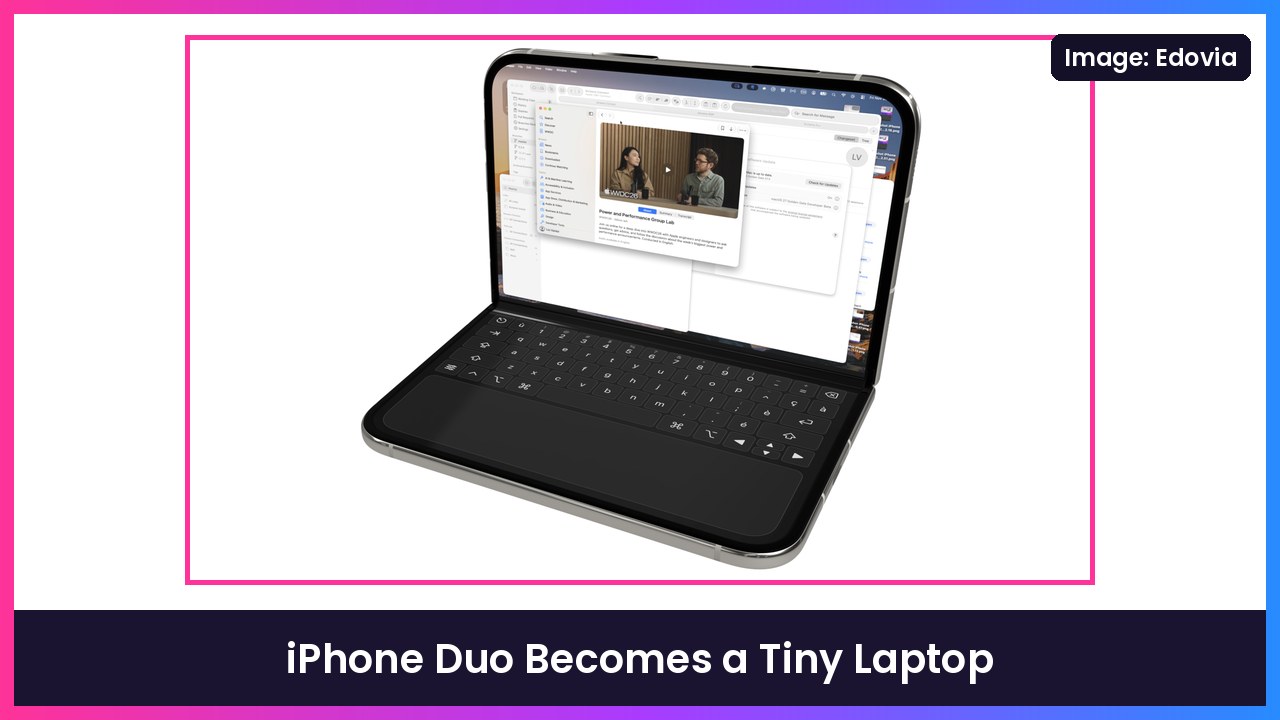
Quick summary: The iPhone Duo folding-into-a-laptop thing is officially happening, guys, two different ways. Today the remote desktop app Screens got a Laptop Mode for iPhone Duo: fold the phone halfway and your remote computer shows up on the top half with a keyboard and trackpad on the bottom half. And a startup called Nøord showed off a $249 keyboard case with real keys, a trackpad and a MagSafe stand that holds the Duo fully open. One is software, one is hardware, and both are getting people talking.
Key takeaways
- Screens 5.10.6 adds Laptop Mode on iPhone Duo: half-fold the phone, remote desktop up top, custom keyboard and trackpad below.
- It’s out now for iOS, iPadOS and visionOS. Edovia says the Mac version follows once Apple approves it.
- Nøord’s keyboard case is $249 with its $69 Jacket case included, in Black, White or Titanium.
- The Duo sits on a MagSafe stand above a full keyboard and a wide trackpad, then the whole thing shuts to 17 mm thick.
- Nøord is a brand-new company, and Notebookcheck says it estimates shipping in January 2027.
Screens Laptop Mode: your Mac, on the top half of your iPhone Duo
Screens, from developer Edovia, is an app for controlling another computer (like your Mac at home) from your phone or tablet. In its announcement today, Edovia put it pretty simply: fold your iPhone Duo halfway and it becomes “a pocket-sized workstation,” with your remote desktop on the upper half and a custom keyboard and trackpad on the lower half. Edovia literally titled the post “Introducing the World’s Smallest Laptop.” Love it.
Here’s what Edovia says you get:
- Trackpad gestures: The same gestures you already use in Screens work on the on-screen trackpad.
- A smarter keyboard: It supports multiple languages, follows your system keyboard language, and you can swipe down on keys for secondary characters, just like on iPad.
- A desktop that fits: Laptop Mode pairs with Screens’ High Performance Screen Sharing, which automatically resizes your remote Mac’s desktop to fit the top half of the Duo, with smooth graphics and remote audio.
9to5Mac’s Zac Hall explains why this is possible now: iOS 27 lets apps respond to the Duo’s hinge position, and Edovia used that to make the app change layouts when you half-fold the phone. The lead image up top is Edovia’s own shot of it in action, and I’ll be honest with you, it really, really does look like a miniature MacBook.
The update also adds new dictation options (type the text directly or paste it through the clipboard, with an optional automatic Return) under Settings > Controls > Dictation, plus portrait resolutions for High Performance mode on iPhone and other fixes. Screens is on the App Store.
Nøord’s $249 keyboard case: real keys instead of glass
If typing on glass isn’t your thing, Nøord has a hardware answer. Its pitch is basically the opposite of Screens: instead of half-folding the Duo and giving half the screen to a glass keyboard, you keep the Duo fully open so you get the whole 7.6-inch inner screen, and you type on physical keys.
Per Nøord’s product page, the case has three parts:
- The Deck: A 5 mm base with a complete keyboard and a wide trackpad, 168 mm wide, so it’s as wide as the open phone.
- The Lift: A stand where MagSafe holds the Duo up at eye level. Lift the phone off and it’s a phone again.
- The Jacket: A two-part everyday case with a strap that stays on the phone. It’s included, or $69 on its own.
Closed up with the phone inside, it measures 168 × 124 × 17 mm. The Verge’s Andrew Liszewski points out that when you fold it shut, the Duo stays open with its inner screen resting against the keys, and called it “an expensive accessory for an expensive phone.” Fair.
A few things to know before you get excited:
- It’s a startup’s first product. Nøord says it’s not affiliated with Apple and is selling a “first edition.” Notebookcheck reports Nøord estimates shipping in January 2027 and recommends some caution buying from a brand without a track record. I agree.
- I haven’t tried it. Everything here comes from Nøord and early coverage, not hands-on time.
Is a laptop-style iPhone Duo actually a good idea?
This is the debate blowing up on X today. Some people say if you want a keyboard and trackpad, just get an iPad mini or a MacBook. Others love the idea of one device that’s a phone in your pocket and a little workstation on a tray table.
Here’s my take. For most people, a free-standing case and the built-in features are plenty: prop the Duo up with a MagSafe kickstand case, use Split View to drag and drop between apps, or open two windows of the same app. If you need your real Mac while traveling, though, Screens’ Laptop Mode is a really clever way to reach a Mac like a MacBook Air back home without carrying it. And Nøord’s case is for the person who wants to write a lot on the Duo and is OK being an early adopter.
Typing a lot on the inner screen without any of this? Check out my guide on splitting the iPhone Duo keyboard for thumb typing.
Sources: Edovia blog, 9to5Mac, Nøord, The Verge, Notebookcheck. Lead image: Edovia.
Thanks for reading. Have a great day.
Subscribe to GregglesTV for daily tech news, reviews and walkthroughs.
See today’s GregglesTV Best Tech Deals or browse all deals posts.
Comments
Comments are moderated. Hate, slurs, spam and scam posts are blocked. Don’t include personal info you wouldn’t want public. See the privacy policy.
Loading comments…