How to Post Daily Deals to X and Threads With Grok Bot (Drafts, Approval, and a Daily Routine)
A beginner's step-by-step guide to turning a daily deal or offer into ready-to-post X and Threads posts with Grok Bot: write the offer once, get two drafts, check the facts, approve, post, and set up a daily routine.
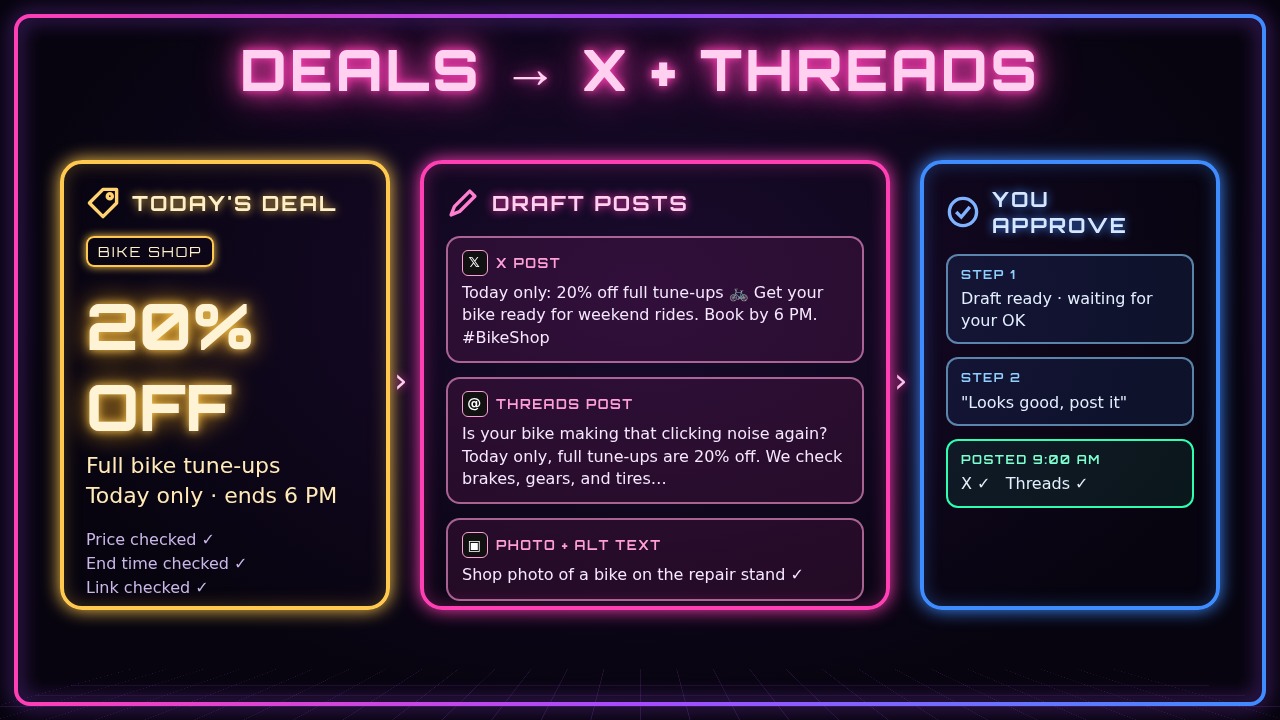
If you run a small shop, a deal only works if people see it. But writing a fresh post every morning, making it fit X’s short format, rewriting it for Threads, and double-checking the price and end time gets old fast. In this guide you’ll use Grok Bot to turn one daily deal into two ready-to-post drafts, one for X and one for Threads, check them, approve them, and then make it a routine that runs every morning.
Grok Bot does the writing, the reformatting, and the checking. You decide what the deal is, and nothing goes out until you say so.
You’ll follow one running example: Marco, who owns Riverside Bike Co., a neighborhood bike shop. He runs a different deal every day, like 20% off tune-ups or a free bell with any kids’ bike, and wants it on X and Threads by 9 AM.
What you need
- A Grok Bot chat
- An X account and a Threads account for your shop
- Those accounts connected to Grok Bot, or a scheduling tool that posts to them (step 2 covers this)
- Your deal details: what’s on sale, the price or discount, when it ends, and where people buy or book
- Optional: a photo of the product or service
- About 15 minutes for the first run
1. Write your deal down in plain words
Start with the facts, not the post. A clear, boring list of details is the best input, because Grok Bot can’t check details you never gave it.
Here's today's deal for my bike shop, Riverside Bike Co.:
- 20% off a full tune-up (normally $90, so $72 today)
- Today only, ends at 6 PM
- Walk in or book at riversidebike.example/book
- Includes brakes, gears, tires, and a chain clean
Don't write anything yet. Just repeat the deal back to me and tell me if anything important is missing.
What you should see: Grok Bot repeats the deal and points out gaps, like “Is the 20% for all bike types?” or “Do you need a booking to get the price?” Answer those now. It’s much easier than fixing a post after it’s live.
2. Check that Grok Bot can post for you
Before you write anything, find out how your posts will actually go out. Ask Grok Bot directly instead of guessing.
I want to post a daily deal to X and Threads for my shop. Can you post to X and Threads for me right now? If you can't post to one of them, tell me what I'd need to connect, or whether a scheduling tool like Buffer could handle it. Walk me through it one step at a time.What you should see: Grok Bot tells you which accounts it can post to and walks you through connecting anything that’s missing. Sign in on the official sign-in page when asked. Never paste your X or Threads password into the chat. If one app can’t be connected, you can still use this guide: Grok Bot writes the post and you paste it yourself.
3. Tell Grok Bot your shop’s voice
A few lines about how you talk makes every post sound like you instead of like an ad.
Before you write posts for Riverside Bike Co., here's our style: friendly and local, short sentences, a little bit of humor, one emoji at most, no ALL CAPS, no "act now!!" hype. We always end with how to buy or book. Remember this style for every deal post I ask for.What you should see: a short confirmation of the style. If you have a past post you liked, paste it in and say “write like this.”
4. Get an X draft and a Threads draft
X posts need to be short. Threads gives you more room for a friendly line or two. Ask for both at once so you only explain the deal once.
Write two posts for today's deal:
1. An X post under 280 characters, with the booking link and one hashtag.
2. A Threads post under 500 characters that's a bit more chatty, with the booking link.
Show me both with their character counts. Don't post anything yet.
What you should see: two drafts that say the same deal in two different lengths, each with a character count. If a draft is over the limit, ask Grok Bot to “trim the X post to under 250 characters.”
5. Fact-check the drafts against your deal
This is the step people skip, and it’s where most bad deal posts come from. Ask Grok Bot to check its own drafts against your list from step 1.
Check both drafts against the deal I gave you. Confirm the discount, the price, the end time, and the link match exactly. List anything that's different or that I didn't tell you, like a claim that the deal applies to "all bikes."What you should see: a short checklist, ideally “everything matches.” If something slipped in that you didn’t say, like “free pickup,” have Grok Bot remove it. Then open the booking link yourself to make sure it works.
6. Add a photo and alt text (optional)
Posts with a photo usually get more attention. If you have a picture of the bike, the product, or your shop, share it in the chat.
Here's a photo of a bike on our repair stand. Attach it to both posts and write short alt text for it, so people using screen readers know what's in the picture.What you should see: the drafts with the photo noted and one line of alt text, like “A blue road bike clamped in a repair stand inside a bike shop.” Use your own photos, or official product photos from the brand. Don’t grab random pictures from the web.
7. Approve and post
When both drafts look right, give a clear go-ahead. Be specific about what’s going out and where.
Both drafts look good. Post the X draft to the Riverside Bike Co. X account and the Threads draft to our Threads account now, with the photo. Send me the links to both posts when they're live.What you should see: Grok Bot confirms each post and sends you the links. Open them and check they look right on your phone. If Grok Bot can’t post to one app, ask for the final text so you can paste it yourself.
8. Or schedule them for later
If your deal starts tomorrow morning, you don’t need to be awake at 9 AM to post it. Ask Grok Bot to schedule it instead.
Don't post these now. Schedule both posts for tomorrow at 9:00 AM Pacific time. Confirm the exact date and time zone back to me before you schedule them.What you should see: a confirmation with the date, time, and time zone. Check the time zone carefully. A post scheduled for 9 AM in the wrong zone can go out in the middle of the night. If scheduling isn’t available for one of the apps, Grok Bot will tell you, and you can set up a routine in step 10 instead.
9. Post a “deal ended” follow-up
Old deal posts can confuse people who see them late. A quick follow-up keeps customers from showing up expecting a price that’s gone.
Write a short reply for both posts that says the tune-up deal has ended, thanks everyone who came in, and says to follow us for tomorrow's deal. Show me the drafts first.What you should see: two short replies. Approve them the same way as step 7, or just post them yourself after 6 PM.
10. (Optional) Make it a daily routine
Once you’ve done this by hand a couple of times, you can have Grok Bot ask you for the deal every morning. (See how to set up daily routines with Grok Bot for the details.)
Every day at 8:00 AM Pacific, message me asking for today's deal. When I reply, write the X and Threads drafts in our shop's style, fact-check them against what I said, and show them to me. Only post after I reply "post it." If I don't send a deal, don't post anything.What you should see: Grok Bot confirms the routine and the time. Ask it to do a test run now so you can see what the 8 AM message looks like. Keeping the “post it” step means a typo never goes out on its own.
Tips and troubleshooting
- Never post a deal you haven’t checked. Wrong prices and wrong end dates are the fastest way to annoy customers. Step 5 takes one minute.
- Keep the link short and real. Use your own shop’s link. If you sell on a marketplace like Etsy, link to your actual listing, and open it yourself before posting.
- Post looks cut off? X counts characters strictly, and links and emojis count too. Ask Grok Bot to “make the X post 30 characters shorter.”
- Every post sounds the same? Ask for “three different openings” and pick one, or tell Grok Bot what you liked about yesterday’s post.
- Don’t overdo hashtags. One or two relevant hashtags is plenty. Skip trending tags that have nothing to do with your shop.
- Grok Bot can’t reach an account? The connection may have expired. Ask Grok Bot to check whether X and Threads are still connected and walk you through reconnecting.
- Earn a commission on links? If you post affiliate or sponsored deals, say so clearly in the post, for example with “#ad” or “affiliate link.”
- Keep secrets out of the chat. Passwords, codes from text messages, and payment details never belong in a post or a prompt.
Recap checklist
- Wrote the deal down in plain words and filled in the gaps
- Checked which accounts Grok Bot can post to and connected what was missing
- Saved your shop’s voice and style
- Got an X draft and a Threads draft with character counts
- Fact-checked both drafts against the deal and tested the link
- (Optional) Added a photo with alt text
- Approved and posted, or scheduled with the right time zone
- Posted a “deal ended” follow-up
- (Optional) Set up a daily 8 AM routine that waits for your “post it”
Gear that makes daily posting easier
You can do all of this from your phone, but a couple of things make the routine smoother. A 2-in-1 laptop like the Lenovo Yoga 7i 16” gives you a big screen for reviewing drafts and photos at the counter before the shop opens. A tablet like the Samsung Galaxy Tab S10 FE is handy for snapping product photos and approving posts between customers. And a second screen like the Samsung 27” Odyssey G5 lets you keep your chat open next to your X and Threads feeds so you can watch replies come in.
Subscribe to GregglesTV for daily tech news, reviews and walkthroughs.
See today’s GregglesTV Best Tech Deals or browse all deals posts.
Comments
Comments are moderated. Hate, slurs, spam and scam posts are blocked. Don’t include personal info you wouldn’t want public. See the privacy policy.
Loading comments…