iOS 27's iPhone Handoff Lets You Use One Phone Number on Two iPhones, Like an iPhone Duo and an iPhone 18 Pro
Apple's new iPhone Handoff moves your number, calls and texts to whichever iPhone you unlock. Here's how it works, what you need, which carriers support it and the catches.
Quick summary: This is the iOS 27 feature I think a lot of iPhone Duo owners have been waiting for without knowing it. It’s called iPhone Handoff, and it lets you keep the same phone number on two iPhones. Unlock one, and your calls, voicemail and texts move to it. Unlock the other, and they move back. So you can carry the Duo when you want the big screen and a regular iPhone like the iPhone 18 Pro Max when you don’t, without juggling two numbers. 9to5Mac spotlighted it on Friday, and Apple has a full support page on how it works. The catch: carrier support is still tiny.
Key takeaways
- iPhone Handoff lets two iPhones share one phone number, but only one is active at a time.
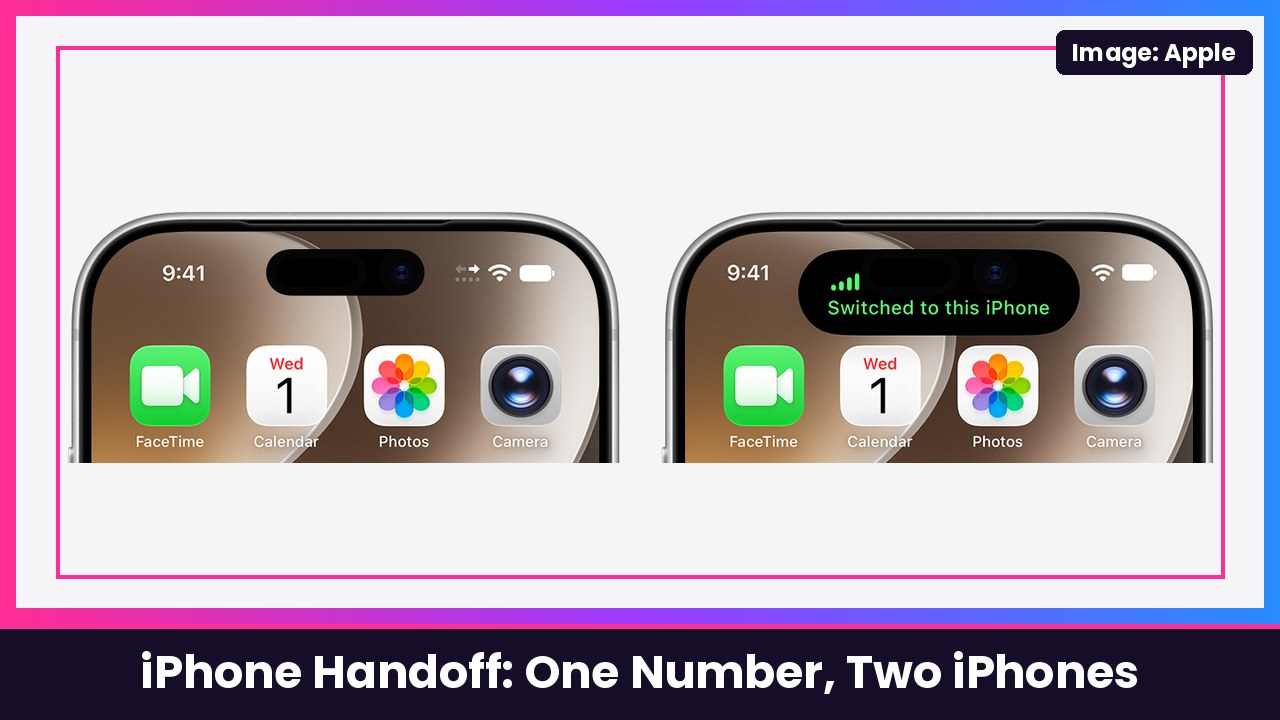
- Unlock the iPhone you want to use and your number switches to it. Apple says you’ll see “Switched to this iPhone” at the top of the screen.
- Your calls, voicemail, messages (iMessage, RCS or SMS) and Find My location follow the active iPhone.
- Both phones need iOS 27 or later, the same Apple Account, and an eSIM from a supported carrier.
- Apple currently lists T-Mobile in the US, Telekom in Germany and EE in the UK. TechRepublic and Engadget report T-Mobile charges $5 per month.
How iPhone Handoff works
Apple’s support page explains that after setup, one phone becomes your main iPhone and the other becomes the secondary iPhone that shares the number. Apple says the main one should be the iPhone you use most often, because some carrier services like Call Forwarding, Caller ID and carrier account management can only be handled there.
Switching is the easy part. Apple says you just unlock the iPhone you want to use and your number becomes active on it. The phone you switched away from shows an arrow icon at the top of the screen, and the one you switched to says “Switched to this iPhone.” Other iCloud data keeps syncing like normal, and third-party apps work on both, following each app’s own syncing.
Apple also has one smart security tip: since unlocking a phone moves your number to it, keep a passcode on both iPhones and keep it private.
What you need
According to Apple, you need two iPhones running iOS 27 or later that are:
- Connected to Wi-Fi
- Signed in to the same Apple Account
- Using Messages in iCloud
- Signed in to FaceTime and iMessage with the same Apple Account
You also need an eSIM from a carrier that supports iPhone Handoff. Right now Apple lists:
- USA: T-Mobile
- Germany: Telekom
- United Kingdom: EE
That means if you’re on Verizon or AT&T in the US, you can’t use it yet. 9to5Mac says Apple plans to expand it to more carriers soon. TechRepublic reports T-Mobile charges $5 per month for it, and that the secondary phone can use calls, texts, cellular data, hotspot, Scam Shield and T-Satellite on eligible plans. Apple’s page says carrier fees might apply, so check with your carrier first.
How to set it up
You can set up iPhone Handoff when you set up a new iPhone, or later in Settings. Apple says to put both iPhones next to each other so you can see the prompts on both. In Settings, Apple’s steps are:
- On your new (or second) iPhone, open Settings and tap Cellular.
- Tap Set Up Cellular or Add eSIM.
- Select Use Number on This iPhone and Another, then tap Continue.
- Tap Continue to start iPhone Handoff setup.
- Pick which iPhone gets the main eSIM: choose Other iPhone to keep it on your current phone, or This iPhone to move it to the new one, then tap Continue.
- On your current iPhone, tap Continue, then follow the prompts on both phones.
During a brand-new iPhone setup, Apple says you’ll see the same Use Number on This iPhone and Another option on the Set Up Cellular screen, and the new iPhone becomes your main iPhone.
The catches
Apple’s support page is pretty upfront about the limits:
- Apple Watch doesn’t switch. Your watch stays paired to one iPhone, so Apple says to pair it to the one you use most. If that iPhone isn’t nearby, the watch can use Wi-Fi or cellular, but some things relayed from the paired phone may not be available. If you’ve got an Apple Watch Series 12, pair it with your daily driver.
- Some Wallet items stay on one phone. Payment cards can work on both, and car keys can be shared after setup, but Apple says some transit passes, IDs and corporate badges may only work on one device at a time.
- Some apps may sign you out on one phone when you sign in on the other, and Apple says apps like banking apps may ask you to approve the second device.
- Turning it off takes a call to your carrier. Apple says deleting the eSIM may not stop the carrier from charging you until you ask them to turn off the service.
- Dual SIM works, but only if both eSIMs are from carriers that support iPhone Handoff. Apple says both numbers then switch together.
- No roaming on EE, per EE’s help page, so UK travelers need to use their main iPhone abroad.
My take
This is honestly a perfect fit for the iPhone Duo. TechRepublic called out the exact use case: an iPhone Duo for the big folding screen and a smaller regular iPhone for travel or everyday carry. And in the 9to5Mac comments, a Duo owner said they run a personal line on their Duo and a work line on an iPhone 18 Pro and would love to carry just one phone with both numbers. That’s the dream right there.
The big problem is carriers. It’s T-Mobile only in the US right now, and it’s an extra monthly fee. If you’re on T-Mobile and you own two iPhones, I’d absolutely try it. Everyone else, keep an eye on your carrier. And if you’re bouncing between two phones all day, an Anker 10000mAh MagSafe pack works with both.
More iPhone Duo: how to switch from Android to iPhone Duo and how to unlock iPhone Duo with your Apple Watch.
Sources: Apple Support: Set up iPhone Handoff, Apple iPhone User Guide: Set up iPhone Handoff on iPhone, 9to5Mac: iOS 27 lets you use two iPhones with the same phone number, TechRepublic: iPhone Handoff in iOS 27, EE: Set up iPhone Handoff, Engadget: What is iPhone Handoff and which carriers support it?.
Subscribe to GregglesTV for daily tech news, reviews and walkthroughs.
See today’s GregglesTV Best Tech Deals or browse all deals posts.
Comments
Comments are moderated. Hate, slurs, spam and scam posts are blocked. Don’t include personal info you wouldn’t want public. See the privacy policy.
Loading comments…