How to Find Your Subscriptions in the New YouTube App (and Get a One-Tap Shortcut Back), Step by Step
YouTube's redesign took the Subscriptions tab out of the bottom bar, and people are still mad about it. Here's where your Subs feed lives now, how to see every channel, fix notifications, and add a home-screen shortcut on Android.
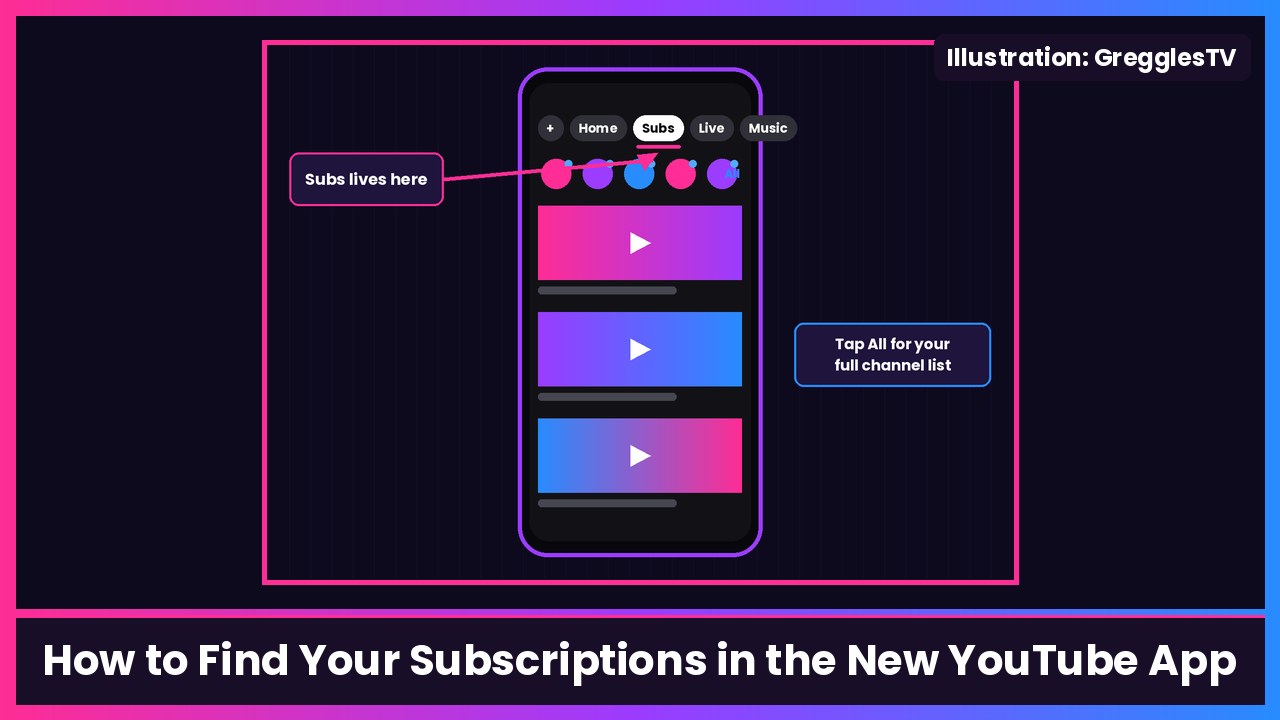
Quick summary: YouTube’s big mobile redesign is still the thing everybody on X is complaining about today. The Subscriptions tab is gone from the bottom bar on Android and iPhone, and it’s now a feed called Subs at the top of the Home tab. 9to5Google says it’s the app’s biggest change in about a decade, and the reactions have been brutal. The good news: your subscriptions didn’t go anywhere. Here’s exactly where they are now, straight from YouTube Help, plus a shortcut trick that gets you back to the old Subscriptions page in one tap on Android.
Key takeaways
- Subs (formerly Subscriptions) now lives in the top bar of the Home tab, right after Home. Per YouTube’s announcement, it’s “moving to the top bar on the Home tab.”
- Tap All in Subs to see your full channel list.
- On Android, long-press the YouTube icon and pick Subscriptions to jump straight in, or pin it to your home screen.
- The top bar also has new feeds: Live, Music, and Movies & TV (only if you pay for something like Primetime Channels), plus custom feeds you build with the + button.
- It’s a server-side rollout, per 9to5Google, so updating the app won’t bring the old layout back.
Step 1: Open your Subs feed
- Open the YouTube app and make sure you’re signed in.
- Tap Home at the bottom if you’re not already there.
- In the top bar of the Home tab, tap Subs.
You can also swipe left or right on the Home tab to move between feeds, since every feed up there is its own tab. Android Authority points out that the swipe is easy to trigger by accident, so if your screen suddenly jumps to Subs or Live, that’s why.
What you should see: the newest videos from channels you’re subscribed to. Per YouTube, there’s also a row of your subscribed channels at the top, and tapping a channel’s artwork opens that channel.
Step 2: See every channel you follow
- In Subs, tap All (top right).
- You’ll get the list of your channels. Use the drop-down arrow at the top to filter or sort it.
YouTube says you’ll see a dot next to a channel that has new content, and the word Live next to a channel that’s streaming right now.
Step 3: Make sure you don’t miss uploads (notification bells)
If the redesign has you checking Subs less, let the app tell you instead. From YouTube Help:
- From the top bar of the Home tab, tap Subs.
- At the top right, tap All.
- Tap the notification bell next to any channel and choose All, Personalized or None.
All gets you notifications for long-form uploads and live streams. Personalized, the default when you subscribe, only sends some of them. One catch YouTube mentions: if you picked All but haven’t watched that channel in a while, those alerts may only show up inside the app, under the bell at the top right.
Step 4 (Android): Get a one-tap Subscriptions shortcut
This is the trick that makes the redesign way less annoying. Android Authority found it, and 9to5Google readers have been passing it around too:
- On your home screen or in the app drawer, touch and hold the YouTube icon.
- In the shortcuts that pop up, tap Subscriptions to open straight into it.
- Want it permanently? Drag the Subscriptions shortcut onto your home screen (Android Authority mentions tapping the + next to it to pin it).
What you should see: Android Authority says this shortcut opens the old-style Subscriptions page, with the filters at the top (like Today) that are missing from the new Subs view. It even says it hopes this isn’t a glitch, so enjoy it while it lasts.
On iPhone, I couldn’t find an equivalent documented by YouTube, so stick with Step 1. It’s still just one extra tap.
Step 5 (optional): Build a custom feed for the channels you care about
Since YouTube is pushing custom feeds hard, you might as well use them. Per YouTube:
- Tap + at the top of your Home feed.
- Describe what you want in your own words, like “new phone and laptop reviews under 15 minutes.”
- Your new feed shows up as a tab at the top, after Home and Subs. Tap the prompt box at the top of the feed any time to change it.
Free accounts can save up to 3 custom feeds, and YouTube Premium members get up to 8. Feeds you make on your phone sync to YouTube on the web if you’re signed in to the same Google Account. Right now custom feeds are rolling out in English to signed-in US viewers (13 and older, with search history on), so you may not have the + yet.
Tips
- Can’t find Subs at all? Make sure you’re signed in. Subscriptions only exist on a signed-in account.
- Tablet users: people in YouTube’s announcement thread are asking whether the tablet app gets the same change, and YouTube’s post only talks about the mobile app.
- Hate the new layout? YouTube’s announcement thread has 100+ replies asking for the old bottom-bar tab back, and its post asks for feedback in the comments. That’s the place to say it.
Recap checklist
- Home tab > Subs in the top bar
- All for the full channel list, with dots for new uploads
- Bells set to All on the channels you never want to miss
- (Android) Long-press the YouTube icon > Subscriptions, and pin it
- (Optional) + to build a custom feed
My take
I get why YouTube did this. It wants you on Shorts, on its new custom feeds, and on recommendations. But a lot of us subscribe to channels because we want to see those channels, and burying that a swipe away feels like a downgrade. The Android shortcut is the real fix right now. If you’re on a Pixel 11 Pro Fold or a Galaxy S26 Ultra, pin it and you basically have your old tab back. And while you’re in your Subs, make sure GregglesTV is in there with the bell on.
Related: How to set up the new Apple TV 4K (and fix YouTube).
Sources: YouTube Help: Subscribe to YouTube channels (Subs in the Home tab top bar, All, dot and Live labels), YouTube Help: Find your way around YouTube (iPhone & iPad), YouTube Help: Manage YouTube notifications, TeamYouTube: New ways to explore YouTube from your Home page (Oct 22; custom feeds, Subs moving to top bar), 9to5Google: YouTube removing Subscriptions bottom bar tab (Oct 22), 9to5Google: YouTube rolls out app redesign without Subscriptions tab (Nov 5), Android Authority: YouTube’s redesign brings one annoying change, but I found a workaround (Nov 1).
Subscribe to GregglesTV for daily tech news, reviews and walkthroughs.
See today’s GregglesTV Best Tech Deals or browse all deals posts.
Comments
Comments are moderated. Hate, slurs, spam and scam posts are blocked. Don’t include personal info you wouldn’t want public. See the privacy policy.
Loading comments…