Gemini on Mac Can Now Use Your Computer: It Clicks, Types and Fills Out Forms in Your Desktop Apps
Google just added computer use to the Gemini app for Mac, so it can work through menus, forms and desktop apps like Blender in a background window while you keep using your Mac. Here's how it works, who gets it and how to try it.
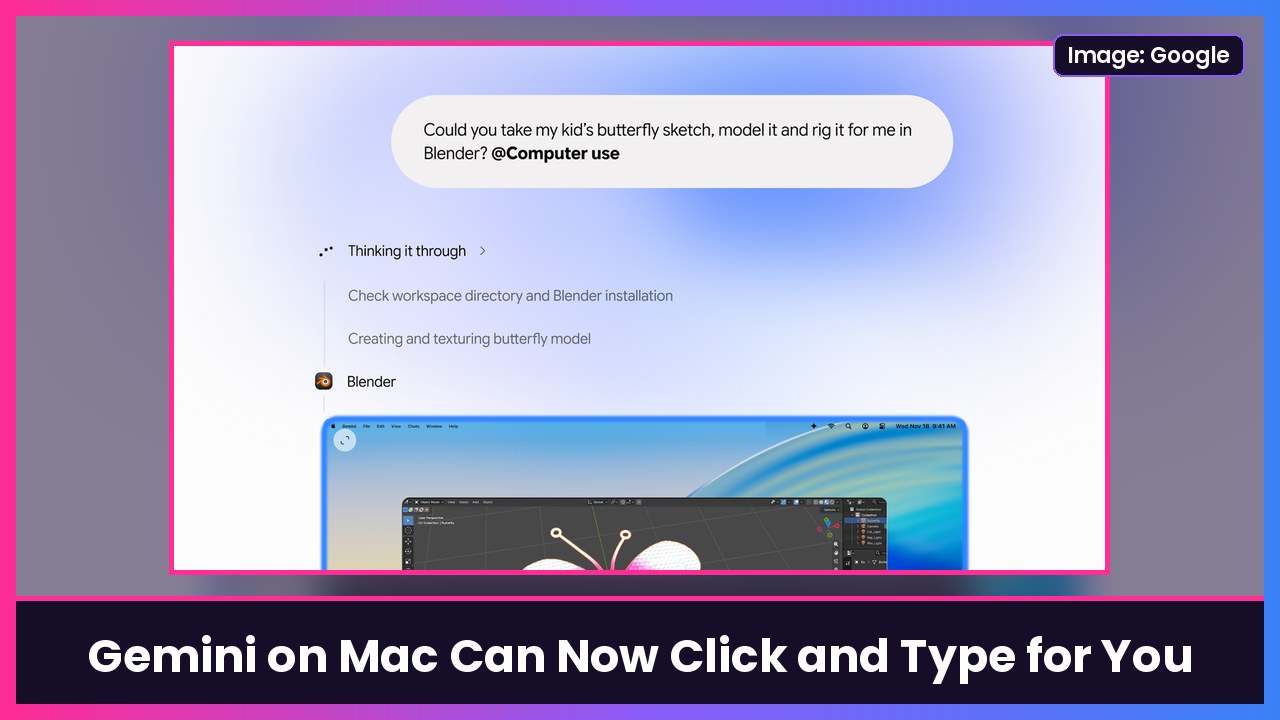
Quick summary: Google’s Gemini app for Mac can now actually use your computer. The new computer use feature lets Gemini click, type, navigate menus and fill out forms across your local files, desktop apps and the web, and it does it in a separate background window so your own screen and cursor stay free. It’s rolling out starting today in English in the US for Google AI Plus, Pro and Ultra subscribers, per Google’s announcement.
Key takeaways
- What’s new: Gemini for Mac can now handle multi-step tasks inside desktop apps and websites, not just read your files.
- It doesn’t take over your screen: Google says Gemini works in an “isolated background window with a live preview right in your chat.”
- You stay in control: you pick which apps Gemini can use, can watch every step, pause it at any time, and approve key actions before they happen. 9to5Google adds that it pauses for logins and payments.
- Who gets it: Google AI Plus, Pro and Ultra users, rolling out in US English starting Nov. 19.
- Requirements: per Google’s fine print, an Apple silicon Mac running macOS Sequoia 15.0 or later and a personal Google account for people 18 and older.
What can it actually do?
Until now, the Mac app’s Task feature (formerly Gemini Spark) could work with your local files alongside Connected Apps like Gmail and Google Calendar, 9to5Google explains. Computer use goes further: Gemini can click and type for you in apps that don’t talk to each other. Google’s own examples:
- Creative work: batch color-grade photos in your design app, or set up complex 3D scenes.
- Forms: pull weights, dimensions and addresses out of local PDFs and fill in multi-box shipping quotes.
- Presentations: grab metrics and screenshots from live dashboards and build a deck in Google Slides.
- Reselling: analyze clothing photos in a folder, research prices, log item details and stage listings on resale sites.
Google’s hero demo literally asks Gemini to take a kid’s butterfly sketch, then model and rig it in Blender.
How to try it
- Make sure you’re on a Google AI Plus, Pro or Ultra plan and have an Apple silicon Mac on macOS Sequoia 15 or later.
- Download or update the Gemini app from gemini.google/mac.
- In your prompt, add @Computer use and describe the task.
- To see which desktop apps it can connect to, go to Customize > Connectors. 9to5Google says new “Desktop” apps like Blender and Autodesk Fusion now show up next to the existing Git and Obsidian integrations.
Since it’s rolling out gradually, don’t panic if you don’t see it yet.
The timing is interesting
This lands right as Apple is tightening how much of your Mac AI apps can touch. As The Verge notes, Apple is preparing new restrictions for apps that want Full Disk Access because of the risks from AI agents with computer use. I broke down those changes in macOS 27.3 puts new limits on how much of your Mac AI apps can control.
My take
This is the kind of AI feature I actually want: boring, repetitive clicking handled in the background while I keep editing. The background window is the smart part, because nobody wants their cursor hijacked mid-task. I’d still start it on low-stakes stuff, and I’d only give it access to the apps you really need, since an agent that can click and type is a big permission.
If you’re shopping for a Mac to run it on, the MacBook Air M5 is the one most people should get, and the 14-inch MacBook Pro M6 makes sense if you’re doing heavy Blender or photo work. For working away from an outlet, I use an Anker 25,000mAh laptop power bank.
More Gemini: Gemini on Apple CarPlay and how to see and edit what Gemini remembers.
Sources: Google: Let Gemini tackle repetitive chores on your Mac, 9to5Google: Gemini app for Mac adds computer use to control desktop apps, The Verge: Gemini on Mac can now use your computer.
Subscribe to GregglesTV for daily tech news, reviews and walkthroughs.
See today’s GregglesTV Best Tech Deals or browse all deals posts.


Comments
Comments are moderated. Hate, slurs, spam and scam posts are blocked. Don’t include personal info you wouldn’t want public. See the privacy policy.
Loading comments…