Signal Now Blocks Siri AI and Gemini From Reading Your Chats, and That Means No Screenshots by Default
Signal is turning on screenshot blocking on iOS 27 and on Android when it detects an AI assistant reading the screen, to keep OS-level AI agents out of your messages. You can turn it off, but Signal says that breaks its privacy guarantees.
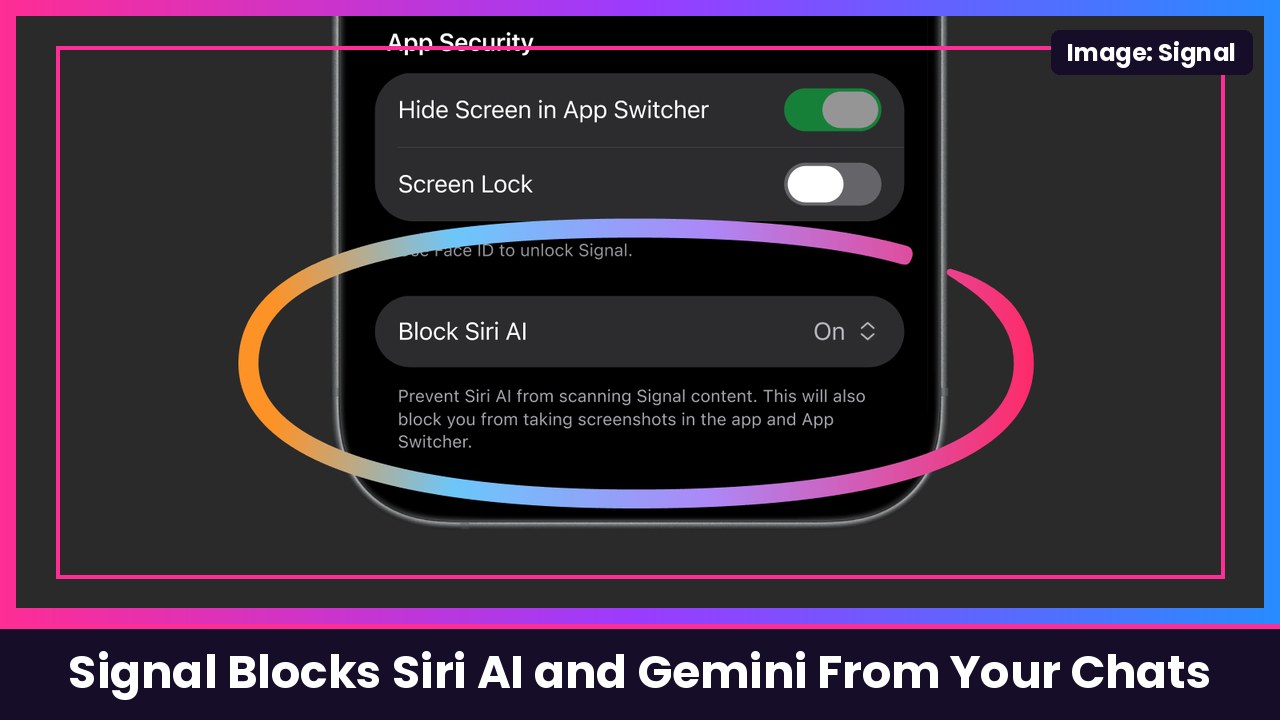
Quick summary: Signal is drawing a line on AI assistants. In a blog post today, Signal president Meredith Whittaker said the app is now blocking screenshots on iOS 27, and on Android when it detects an AI assistant trying to read the screen, to stop OS-level agents like Siri AI (with Onscreen Awareness) and Gemini from capturing your Signal messages. You can turn the protection off, but Signal warns that doing so “will potentially expose your (and your contacts’) Signal content to these AI agents, and break our privacy guarantees.”
What’s changing in the Signal app
- iPhone (iOS 27): Signal’s settings now include a Block Siri AI toggle in the App Security section, next to Hide Screen in App Switcher and Screen Lock. Signal’s own screenshot of the setting describes it as preventing “Siri AI from scanning Signal content” and says it “will also block you from taking screenshots in the app and App Switcher.” Android Authority calls it the new Block Siri AI setting.
- Android: Signal uses its existing Screen security setting. Per Signal, the app automatically turns on Screen security when it detects an AI assistant trying to access the screen. That setting blocks screenshots in the recents list and inside the app.
- Want screenshots back? Signal says you can disable the protection in the app’s settings, with the privacy warning above.
- Not on Mac: Signal says it can’t do this on macOS yet, because it can’t reliably block screenshots there, which is how most agents read app data.
Why Signal is doing this
Signal’s argument is pretty simple: end-to-end encryption protects your messages in transit, but if an AI assistant built into the phone reads them right off the screen, that data can end up in “whatever local database or remote server an OS-level AI agent is using at that moment,” outside of Signal’s control. Whittaker calls the current wave of OS-level AI agents “an existential threat to Signal.”
Signal says it already did something similar last year on Windows, using screenshot blocking to keep Microsoft Recall from saving Signal chats. And it’s also worried about third-party agents like Meta’s Muse that ask for deep accessibility permissions during setup, which Signal says can act like “a skeleton key” to app data.
Signal is also upfront that this is incomplete. Blocking screenshots doesn’t stop “more sneaky ways” an agent could get at data, like reading content already stored on the device through the filesystem. On Android, it also can’t reliably detect screen access on every manufacturer’s version of the OS.
What Signal wants from Apple, Google and Microsoft
Signal is asking the big three OS makers for two things:
- An easy, well-documented way for apps to opt out of AI data access, including screen reading, filesystem access, notifications and APIs, without breaking the app.
- Better documentation on how these AI agents actually access and process data.
The good news, per Signal: it’s “cautiously optimistic” because Google and Apple are “engaging with us” on how these systems should work with privacy-sensitive apps. The Verge has more on the broader fight.
What this means for you
If you use Signal on an iPhone running iOS 27 or a recent Android phone, expect screenshots in Signal to stop working once this protection kicks in. That’s on purpose. If you really need to screenshot a chat, you can turn it off, but think about whether the other people in that chat would be OK with an AI assistant seeing it.
My take
This is the right call from Signal, honestly. Every phone maker is racing to make its assistant see everything on your screen, from Siri AI on the iPhone Duo to Gemini on the Pixel 10 Pro and the Galaxy S26 Ultra. Apps that hold your most private stuff need a real off switch, and banking and health apps are going to want the same thing. I’d love to see Apple and Google give developers a proper opt-out instead of making them block screenshots for everybody.
Related: Apple is building its own AI agent and Gemini on Mac can now use your computer.
Sources: Signal: Signal is Serious About Protecting Your Privacy (Nov 20), The Verge, Android Authority.
Subscribe to GregglesTV for daily tech news, reviews and walkthroughs.
See today’s GregglesTV Best Tech Deals or browse all deals posts.
Comments
Comments are moderated. Hate, slurs, spam and scam posts are blocked. Don’t include personal info you wouldn’t want public. See the privacy policy.
Loading comments…