Drop Your Galaxy Phone and Samsung Might Pitch You Care+: One UI 9.5 Code Ties Protection Plan Ads to Your Phone's Drop Sensor
Code in the One UI 9.5 beta shows Samsung's Warranty and care app using your Galaxy's drop detection to time Samsung Care+ sales notifications. Here's how it works, what data it uses, and how to turn the notifications off.
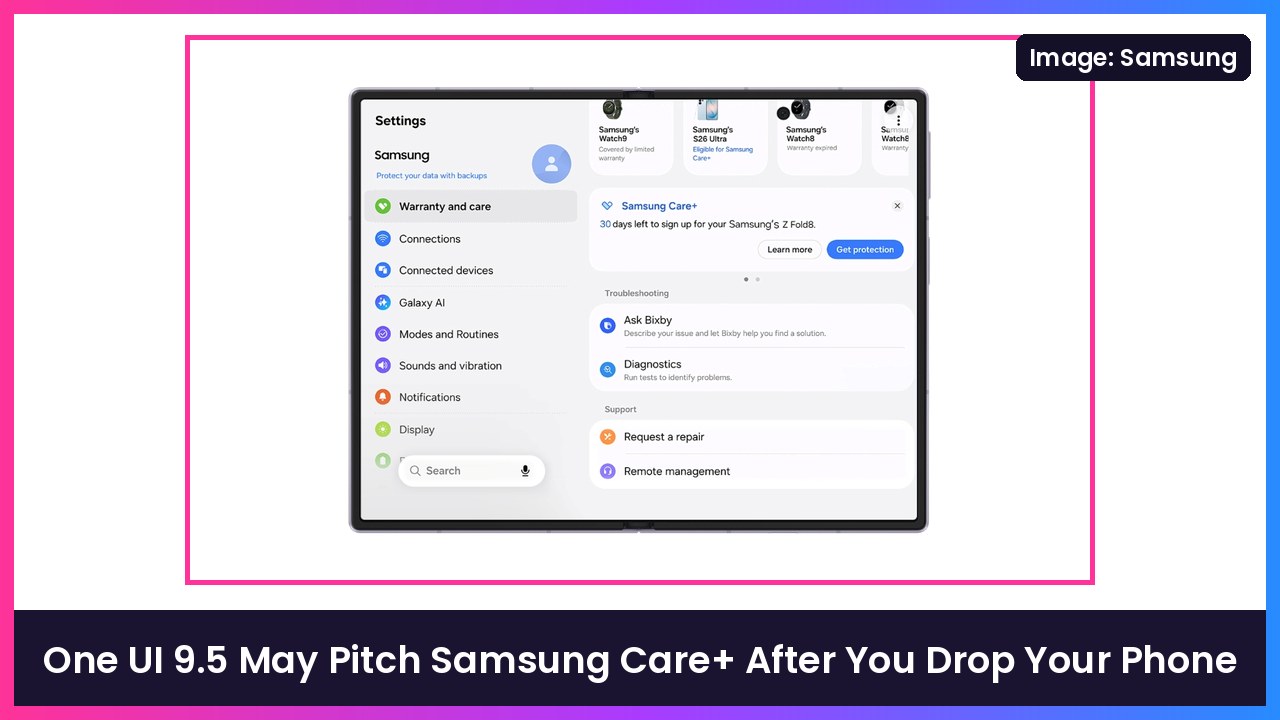
Quick summary: Here’s one that’s going to make a lot of Galaxy owners raise an eyebrow. Android Authority dug into the One UI 9.5 Beta 1 build on a Galaxy S26 Ultra and found code that lets Samsung’s Warranty and care app use your phone’s drop detection to decide when to show you a Samsung Care+ sales notification. Drop your phone hard on the sidewalk, and a little later you might get a “Protect your phone from falls” pitch. The notification doesn’t mention the drop. This is beta code, so it could change before it ships, but here’s what we know and how to switch it off.
Key takeaways
- What’s happening: In One UI 9.5 Beta 1, Warranty and care (version 1.9.50.23) can read your phone’s drop data, including how far it fell and whether it hit a hard or soft surface, and use it to trigger Samsung Care+ recommendations.
- The triggers in the code: one fall of 90cm or more onto a hard surface within 24 hours, or three falls of 60cm or more onto a hard surface within 30 days. Falls onto a bed or couch don’t appear to count.
- The notification: It shows up in a “Marketing” notification category that’s on by default, and it doesn’t say anything about the drop.
- Your data: Android Authority says the drop log stays on your phone for 30 days. Only the recommendation type gets sent to Samsung’s analytics, not the height, surface or time.
- Not final: It’s in beta code. Samsung could change it or pull it before the stable One UI 9.5 release. Android Authority says it has asked Samsung for comment.
How it works
Quick background. Samsung introduced the Warranty and care menu with One UI 9 on the Galaxy Z Fold 8 series. Per Samsung’s own newsroom post, it lives right in Settings and puts your warranty status, Samsung Care+ eligibility, diagnostics, Bixby help and repair booking in one place. It’s actually a really useful hub (that’s it in the image above, on a Galaxy Z Fold 8).
According to Android Authority, recent Galaxy phones like the S26 Ultra and Fold 8 already detect drops in One UI 9. A drop sensor logs each fall on the device. What’s new in the 9.5 beta is that this data now gets passed to Warranty and care, and Android Authority says that’s the only app on its S26 Ultra that can receive it, so third-party apps shouldn’t be able to listen in. It also found the same sensor active on a Galaxy Z Fold 8.
When one of those drop rules is met, the code can show notifications like:
- “Protect your phone from falls” / “Sign up for Samsung Care+ for protection against unexpected repair costs. Explore coverage options.”
- “Protect against accidental damage,” with the same body text.
Drops aren’t the only trigger, either. Android Authority found the same system can pitch Care+ when you travel to a new country, after a repair and as your sign-up window closes.
The guardrails Samsung built in
To be fair, it’s not a firehose. Per Android Authority, in this build:
- Only phones that are eligible for Care+ but not enrolled get these, so it’s mostly recently bought phones.
- You need to be signed in to a Samsung account and have accepted Warranty and care’s privacy notice.
- Recommendations only go out between 9 AM and 8 PM.
- Each drop-based recommendation fires at most three times, and only one is active at a time.
- Samsung can turn the whole thing off remotely.
The catch: Care+ won’t cover the drop that triggered it
This is the part I really want people to know. As Android Authority points out, Samsung Care+ doesn’t cover damage that happened before you signed up. So if that fall already cracked your screen, signing up after the notification won’t pay for that repair. In the US, Android Authority says you can usually only add Care+ when you buy your phone or within 60 days, outside of occasional open enrollment windows, and a later sign-up may need your phone to pass a device check first.
How to turn these notifications off (once One UI 9.5 arrives)
Android Authority shared the path from the beta build:
- Open Settings and tap Notifications, then App notifications.
- Tap the three-dot menu and turn on Show system apps.
- Select Warranty and care, then Notification categories.
- Turn off Marketing.
One note: Android Authority says Warranty and care still records drops locally even with Marketing turned off, since there’s no separate switch for drop tracking in this build. And since this is beta software, menu names could change by the time it ships. If you’re on One UI 9 right now, you won’t see any of this yet. Curious about the beta? Here’s how to join the One UI 9.5 beta and what’s new.
My take
I’ll be honest with you, I don’t hate the idea of a nudge after a scary drop. That’s literally what Care+ is for, and the data staying on the phone is good. But a pitch that pops up right after you fumble your phone, without saying “hey, we noticed a fall,” feels a little sneaky. A clear message and an easy opt-out right in the notification would go a long way. My advice: if you want Care+, decide when you buy the phone, not after it hits the pavement. If you’re shopping for a new Galaxy this Black Friday, the Galaxy S26 Ultra, Galaxy Z Fold 8 and the more affordable Galaxy S26 FE are all great picks, and that’s the moment to think about protection.
Sources: Android Authority: One UI 9.5 may try to sell you Samsung Care Plus if you drop your Galaxy phone, Samsung Global Newsroom: ‘Warranty and care’ menu simplifies device care for new foldables, Digital Trends: Dropped your phone? One UI 9.5 Beta’s new feature will remind you to sign up for Samsung Care+.
Subscribe to GregglesTV for daily tech news, reviews and walkthroughs.
See today’s GregglesTV Best Tech Deals or browse all deals posts.
Comments
Comments are moderated. Hate, slurs, spam and scam posts are blocked. Don’t include personal info you wouldn’t want public. See the privacy policy.
Loading comments…