How to Check Your iPhone Duo's Hinge for Problems Using Apple's Own Checklist (and What to Do Next), Step by Step
Weird noise when you fold it? Won't close all the way? Apple published a hinge troubleshooting guide for iPhone Duo. Here's how to run Apple's checks yourself, clean it safely, check your warranty and get it fixed.
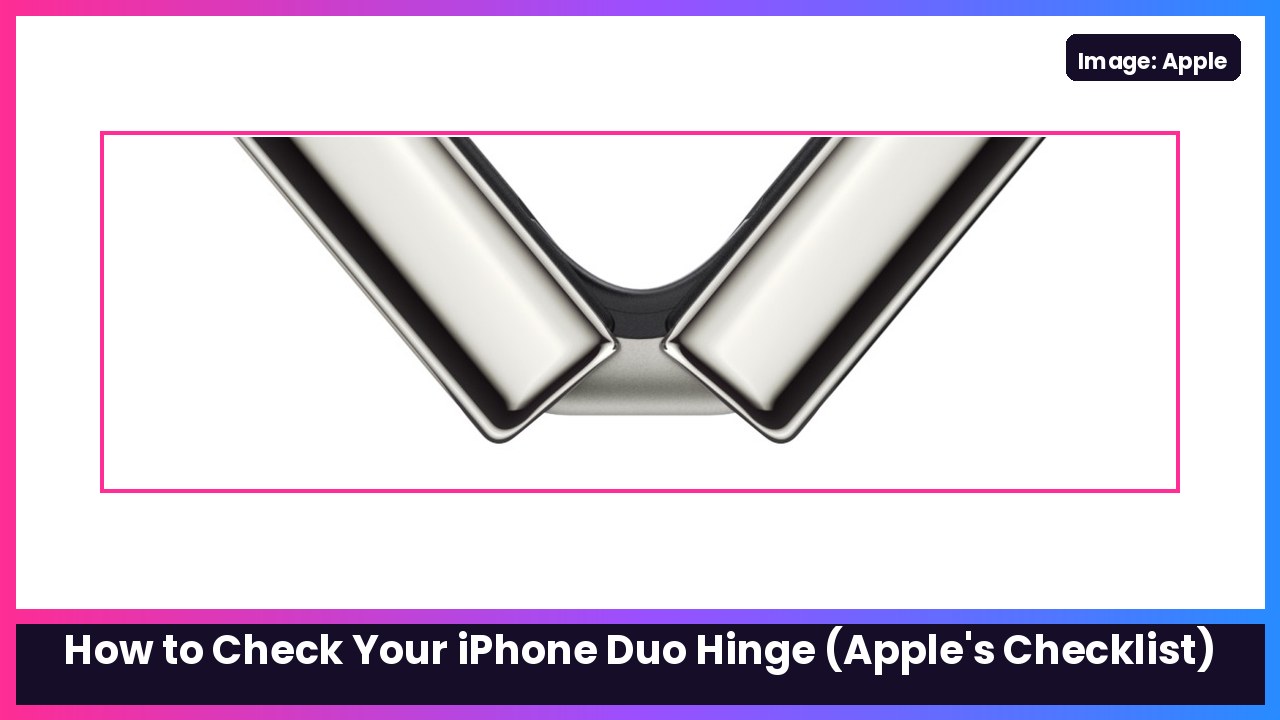
Quick summary: The hinge is the part of the iPhone Duo that a regular iPhone just doesn’t have, so it’s the part people worry about. Apple actually published a support page called iPhone Duo Troubleshooting Hinge Issues with its own checklist. The big thing it says up front: there aren’t diagnostics or software remedies for hinge issues, so restarting, updating or erasing your phone won’t fix it. Here’s how to run Apple’s checks yourself, clean it the safe way, and get it looked at if something’s off.
Key takeaways
- Apple lists five hinge problems: won’t open or close completely, unexpected noise when opening or closing, a loose hinge, a bent or broken hinge, and enclosure damage that affects the hinge.
- No software fix. Apple says you don’t need to restart, update, or restore the device for hinge issues.
- Apple’s checks: take off third-party cases and screen protectors, open and close it while listening, see if it feels loose, stiff or misaligned, check that it holds in all positions, and look for dust, dents or scratches.
- Clean it the safe way: power off, unplug cables, soft, slightly damp, lint-free cloth. No compressed air, no bleach or hydrogen peroxide.
- Still not right? Check your coverage in Settings > General > AppleCare & Warranty, back up, and contact Apple.
Before you start
- Know which problem you have. Is it a sound? Does it not close flat? Does it flop open? Write it down. That helps a lot when you talk to Apple.
- Back up your iPhone. If it ends up going in for service, you’ll want your stuff saved. Go to Settings > [your name] > iCloud > iCloud Backup > Back Up Now.
- Have a soft, lint-free cloth ready, like a lens cloth or the cloth you clean glasses with.
Step 1: Read Apple’s hinge handling rules
Apple’s first step is literally “refer to the user guide” for hinge handling. Here’s what the iPhone User Guide handling page says for iPhone Duo:
- Keep sand and grit away from the hinge.
- Before you open iPhone Duo, make sure the hinge is clean.
- Before you close it, remove anything from the inner display. Folding hard things like keys or coins inside can damage the inner display.
If your problem started right after a beach trip or after it rode around in a pocket with keys, that’s a clue.
Step 2: Take off any case and screen protector
- Remove any third-party case.
- Remove any third-party screen protector.
- Try folding it again.
What you should see: If the problem goes away with the case off, your case may be the thing rubbing or getting in the way of the fold, not the hinge.
Step 3: Open and close it and listen
- Slowly open the Duo all the way.
- Slowly close it all the way.
- Do it a few times and listen for noise as you go.
- Pay attention to how it feels. Apple says to check if the hinge feels loose, stiff, or misaligned.
Step 4: Check that it holds every position
- Open it partway, like a tent or a little laptop, and let go.
- Try a few different angles.
Apple says to verify that the hinge securely holds the device in all positions. If it flops open or closed on its own, note that.
What you should see: The Duo stays put at whatever angle you leave it. If you’re curious what heavy wear can do to a hinge over time, CNET’s long-running fold test is worth a look.
Step 5: Look for dust, dents and scratches
- Look closely along the hinge for particles or dust.
- Check the outside of the phone (the enclosure) for dents or scratches, especially near the hinge.
A dent near the hinge after a drop is the kind of “enclosure damage that affects hinge operation” Apple is talking about.
Step 6: Clean it the way Apple says
- Unplug all cables.
- Turn off your iPhone Duo.
- Wipe the displays with a soft, slightly damp, lint-free cloth. If you need to, clean the whole iPhone the same way.
Apple’s warnings for this step:
- Don’t use products with bleach or hydrogen peroxide.
- Don’t get moisture in any openings.
- Don’t submerge the iPhone in any cleaning agent.
- Don’t use compressed air. I know it’s tempting for a hinge. Apple says no.
Then turn it back on and repeat Steps 3 and 4.
Step 7: Check your warranty or AppleCare
If the problem is still there, see what coverage you have before you contact Apple:
- Open Settings.
- Tap General.
- Tap AppleCare & Warranty.
- Tap your iPhone Duo to see your coverage.
Apple’s page Find information about your AppleCare plan walks through this too.
Step 8: Get it fixed
Apple’s hinge page says that if the checks don’t fix or explain the issue, the repair is replacing the inner display assembly. Apple also notes that this requires ordering parts and tools and that replacing a part may not resolve the issue.
For most people, that means letting Apple handle it:
- Go to support.apple.com/repair and start a request, or book an Apple Store appointment.
- Tell them exactly what you found in Steps 2 through 6. “It clicks when I close it, even with the case off and after cleaning” is way more useful than “the hinge is broken.”
If you’re the do-it-yourself type, Apple does sell iPhone Duo parts through Self Service Repair. I covered which iPhone Duo parts Apple sells and who should try it. Honestly, for a hinge issue on a brand-new foldable, I’d go through Apple.
Tips
- Don’t erase your phone trying to fix the hinge. Apple says software won’t help here.
- Don’t spray anything into the hinge and don’t use compressed air.
- Take photos or a short video of the problem before your appointment.
- A hinge-protection case like the Benks ArmorGrid Air hinge-protection case or the SUPCASE with a 360 stand can help keep grit and bumps off the hinge day to day. Just take it off when you’re running Apple’s checks.
- Heading in for service? Charge it up first. A MagSafe power bank helps if you’re out all day.
- Seeing other weird stuff, like screen lines? Here’s my roundup of what iPhone Duo owners are reporting.
Recap checklist
- Followed Apple’s handling rules: hinge clean, no grit, nothing left on the inner screen before closing
- Case and screen protector off
- Opened and closed it, listened for noise, checked for loose, stiff or misaligned
- Checked that it holds every position
- Looked for dust along the hinge and dents or scratches
- Cleaned it: power off, cables unplugged, soft slightly damp lint-free cloth, no compressed air
- Checked Settings > General > AppleCare & Warranty
- Backed up and contacted Apple at support.apple.com/repair
Sources: Apple Support: iPhone Duo Troubleshooting Hinge Issues, Apple iPhone User Guide: Important handling information for iPhone, Apple Support: Find information about your AppleCare plan, 9to5Mac: Apple publishes iPhone Duo support documents covering hinge, Touch ID, cases, more.
Subscribe to GregglesTV for daily tech news, reviews and walkthroughs.
See today’s GregglesTV Best Tech Deals or browse all deals posts.
Comments
Comments are moderated. Hate, slurs, spam and scam posts are blocked. Don’t include personal info you wouldn’t want public. See the privacy policy.
Loading comments…