Halide 3.4 Turns the iPhone Duo's Cover Screen Into a Fill Flash and Adds a Bigger XL Viewfinder
Lux Optics' Halide Mark III 3.4 update lets iPhone Duo owners use the outer screen as a soft fill flash or a live preview for the person you're shooting, and adds an XL viewfinder when the Duo is fully open.
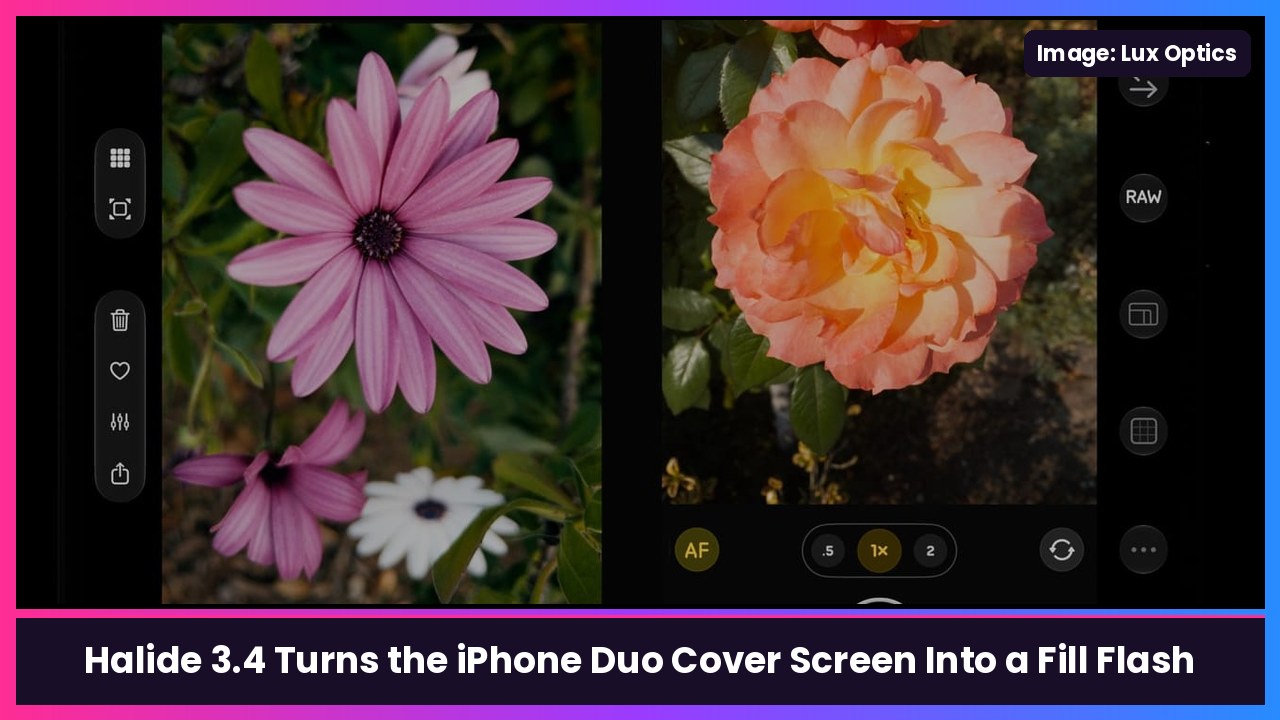
Quick summary: The pro camera app Halide Mark III just got its biggest iPhone Duo update yet. Version 3.4, out now on the App Store, lets you use the Duo’s outer screen as a fill flash in low light, show a live preview on the cover screen so the person you’re shooting can see the frame, and adds a bigger XL viewfinder when the Duo is fully open.
What’s new in Halide 3.4 for iPhone Duo
From Lux Optics’ release notes on the App Store, plus reporting from 9to5Mac and PetaPixel:
- Cover screen fill flash: in low light, Halide can light your subject with the Duo’s outer screen, which Lux says gives “better lighting without the harsh lighting of the dedicated flash.” Their tip: turn your screen brightness all the way up before you shoot.
- Outer screen modes while the Duo is open: mirror your camera controls on the cover screen, or show a clean, full-size viewfinder with no controls, so the person in front of the camera can see how you’ve framed them.
- XL mode: with the Duo fully open, you can swap the “last photo” review pane for a much bigger viewfinder, with controls on both sides for two-handed shooting.
- “Embrace the crease”: in the half-open pose, Halide now puts its histograms right along the fold, and the Photo Lab editor got a better layout for that pose too.
- Not on a Duo? Halide 3.4 brings back the color and luminance histograms and the shutter timer from Halide Mark II for every iPhone.
Why this is a big deal for Duo owners
Halide is leaning into what only a foldable can do: the person you’re shooting gets their own preview on the cover screen, and that same screen doubles as a soft light for portraits at a dark dinner table, without blasting anyone with the LED flash. PetaPixel points out the update landed just shy of a month after the Duo went on sale Oct 23.
How to try it
- Update Halide Mark III from the App Store (it’s free to download, with a 7-day trial on the annual plan or a one-time purchase).
- Open your iPhone Duo fully and launch Halide. Lux says you can choose between mirroring your controls on the outer screen or a clean, full-size viewfinder there.
- Shooting in low light? Turn your screen brightness to max first, per Lux, then use Halide’s cover screen fill flash.
My take
This is exactly the kind of update that makes a $1,999 foldable feel worth it. Halide was already one of the best camera apps on iPhone, and the cover screen preview is the feature I wish Apple’s own Camera app did better. If you’re shooting a lot on the Duo, a case with a stand like the SUPCASE 360 camera stand case or the MOBOSI kickstand case makes tripod-style shots a lot easier, and the Anker MagSafe battery keeps you going when the screen is cranked to max.
Related: How to customize the camera controls on iPhone Duo and how to take a screenshot on iPhone Duo.
Sources: Halide Mark III on the App Store (version 3.4 release notes), 9to5Mac (Nov 19), PetaPixel (Nov 19), The Verge (Nov 19), Lux Optics: Halide for Duo.
Subscribe to GregglesTV for daily tech news, reviews and walkthroughs.
See today’s GregglesTV Best Tech Deals or browse all deals posts.


Comments
Comments are moderated. Hate, slurs, spam and scam posts are blocked. Don’t include personal info you wouldn’t want public. See the privacy policy.
Loading comments…