Pebblebee Alert Dispatch Puts a Real Person Behind Your Tracker's SOS Button
Pebblebee's new Alert Dispatch connects your Clip or Halo tracker to a trained dispatch agent who texts, calls and can send emergency services. Here's how it works, what it costs, and what it won't do.
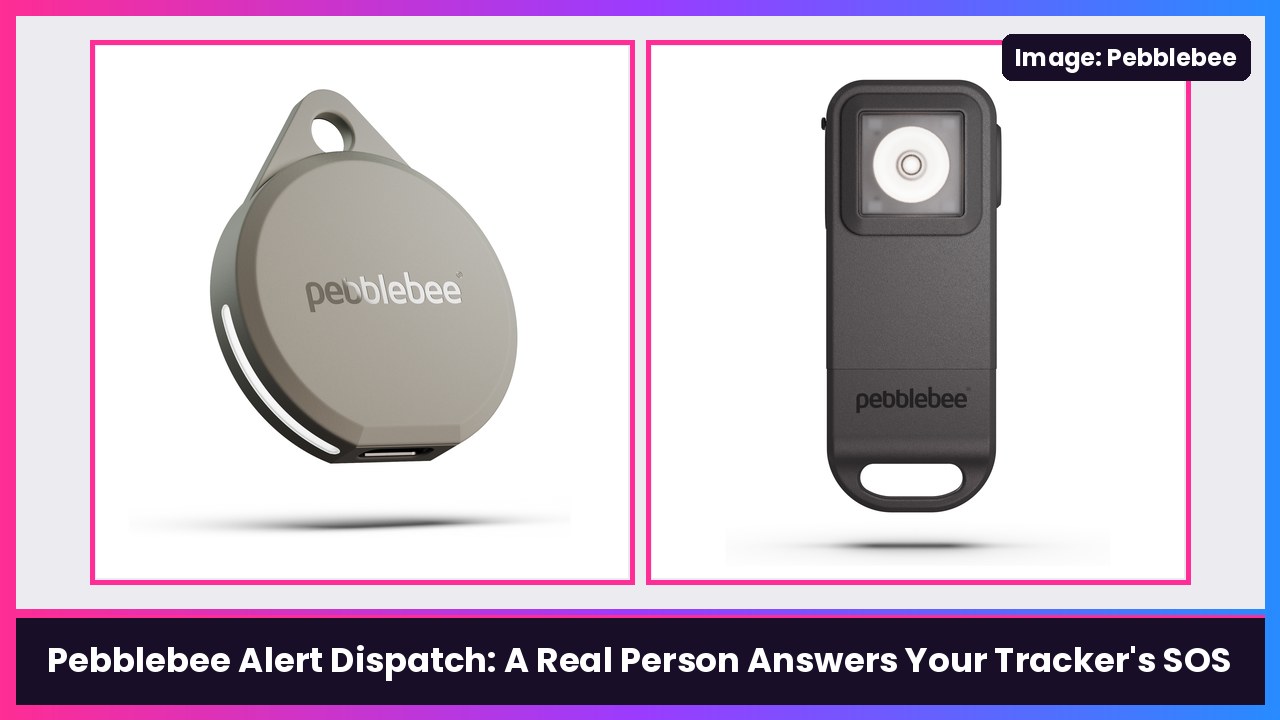
Quick summary: Pebblebee makes some of my favorite trackers for Android, and its trackers already have an Alert button that sets off a siren and shares your location. Now Pebblebee is adding Alert Dispatch, a paid service where a real, trained dispatch agent responds when you trigger an Alert. They text you first, then call, and if you need help or don’t respond, they can request emergency services for your location. It’s powered by Noonlight, it’s U.S.-only, and it works with the Clip 4, Clip 5 and Halo, according to Pebblebee’s help center.
How it works
You trigger an Alert the same way you do now. 9to5Google says that’s rapidly pressing the button on a Clip, or disconnecting the Halo. Then, per Pebblebee:
- If you have a Safety Circle, those people get notified and your location is shared. (You don’t need a Safety Circle to use Alert Dispatch.)
- A dispatch agent texts you. You can reply by text instead of talking, which matters if it isn’t safe to speak.
- If you don’t reply, the agent calls you a few seconds later.
- The agent checks if you’re safe, and you confirm it’s you with your 4-digit Safe PIN.
- If you need help, or the agent can’t reach you after 3 calls in a row (about 5 minutes), they request emergency services for your last known location. The agent decides whether that’s police, paramedics or firefighters. If no contact is made, Pebblebee says police are sent by default.
There’s also a Check-In Call option on Clip 5 and Halo: a private call from an agent for moments that aren’t emergencies yet. Pebblebee says your Safety Circle isn’t notified unless it escalates. Think walking to your car late at night, or a first date that’s feeling a little off.
Save these numbers. Pebblebee says the dispatch center always texts and calls from 619-304-4016, 619-329-8736, 619-329-8928 or 619-329-8846, so add them to your contacts during setup. Fun fact: those are San Diego area codes, same as me.
What it costs
From 9to5Google:
- 1 person: $5.99/month or $49.99/year
- 4 people: $19.99/month or $159.99/year
- 8 people: $39.99/month or $319.99/year
Pebblebee says each person on a 4- or 8-seat plan gets their own Safety Circle, Safe PIN and Emergency Profile, and the plan owner can’t see other people’s safety info.
What it won’t do
Pebblebee is refreshingly upfront about the limits, and you should know them before you rely on it:
- It doesn’t replace calling 911 yourself.
- It doesn’t detect falls, crashes or distress. An Alert only starts when you trigger it.
- It needs an internet connection on your phone.
- It can’t send responders outside the U.S., and you need a U.S. phone number to turn it on.
- Accidental Alerts are a real thing. If you set one off by mistake, reply to the text or answer the call. Pebblebee warns that missed calls after an accidental Alert can result in emergency services being sent, and stopping the siren on your tracker doesn’t cancel it. You have to mark yourself safe in the Pebblebee app.
- Some cities require an alarm permit or charge for false alarms, and Pebblebee says that’s on you.
On privacy, Pebblebee says the dispatch center gets your name, phone number, location and whatever Emergency Profile details you add. Calls may be recorded and transcribed, and records are kept for 1 year.
Which tracker should you get?
- Pebblebee Clip 5: The everyday pick. It’s a key and bag tracker first, with a loud siren and Alert built in. Its Amazon listing says it works with either Apple Find My or Google’s Find Hub (one network at a time) and recharges over USB-C. It supports both Emergency Calls and Check-In Calls.
- Pebblebee Halo: More of a personal safety alarm that also tracks. You pull it apart to trigger the Alert. Also supports Check-In Calls.
If you’re on a Galaxy S26 Ultra or a Pixel, set it up in Find Hub first. Pebblebee’s Clip 5 setup guide says to do Find Hub before adding it to the Pebblebee app, or you can run into setup issues.
My take
I like this a lot, especially for parents of teens, college students, and anybody who walks or runs alone. A siren is great, but a siren doesn’t call anyone. Having an actual person text you within seconds, with the option to just text back if you can’t talk, is a smart design. At $49.99 a year for one person, it’s a pretty easy add-on if you already own a Clip 5 or Halo. Just remember it’s a backup, not a replacement for calling 911, and save those four numbers so you don’t ignore the call.
Sources: Pebblebee: How Alert Dispatch works, Pebblebee: Alert Dispatch FAQs, 9to5Google, Pebblebee: Set up your Clip 5 with Google’s Find Hub.
Subscribe to GregglesTV for daily tech news, reviews and walkthroughs.
See today’s GregglesTV Best Tech Deals or browse all deals posts.
Comments
Comments are moderated. Hate, slurs, spam and scam posts are blocked. Don’t include personal info you wouldn’t want public. See the privacy policy.
Loading comments…