Google's Pixel Virtual Gamepad Is Finally Rolling Out: Your Pixel Fold Becomes a Handheld
Google's November Play Store update adds Pixel virtual gamepad, the on-screen controller from Android 17's foldable gaming mode. Here's how it works, what it supports, and what we still don't know.
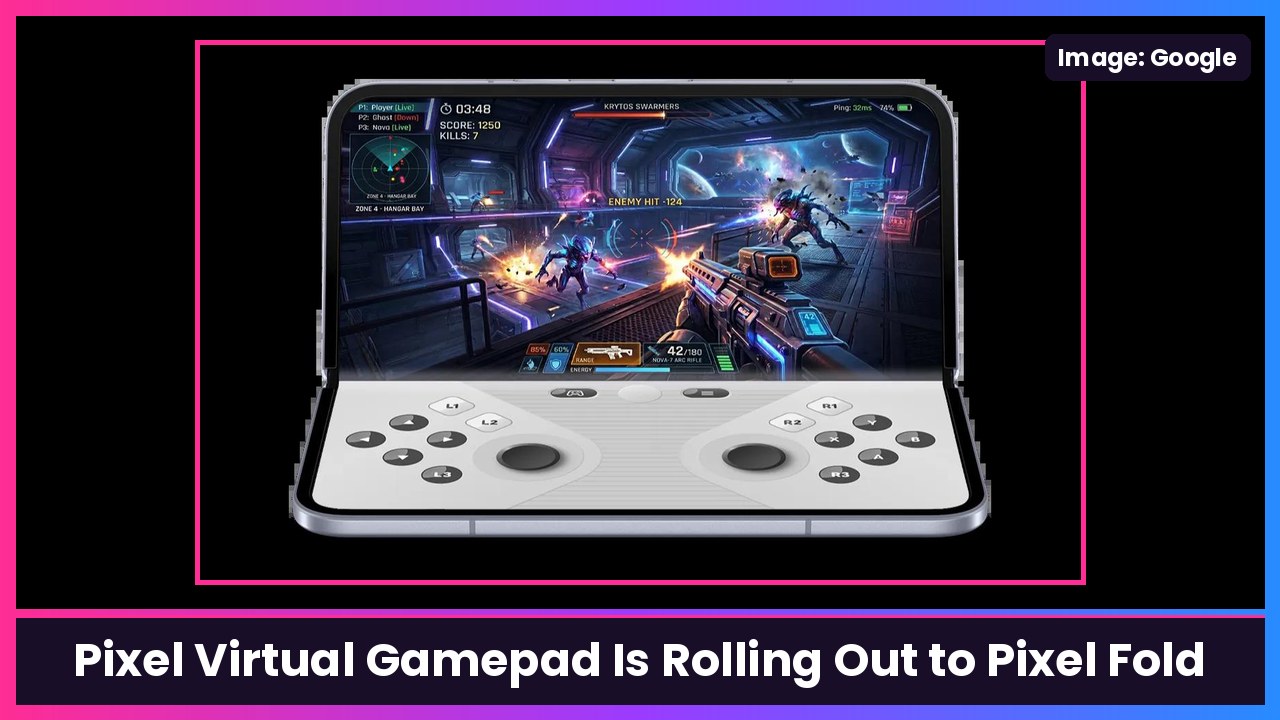
Quick summary: Remember Android 17’s foldable gaming mode, the one where the bottom half of your foldable turns into a controller? Google announced it back in June and said it was coming “in the coming months.” It’s finally here, at least for Pixel. Google’s own Google Play Store v54.1 release notes (dated Nov 16) now say: “You can now use an on-screen game controller in supported Android games with Pixel virtual gamepad when your Pixel Fold is open.” If you’ve got a Pixel 11 Pro Fold, keep an eye out.
What Google actually said
The line comes straight from Google’s system release notes for the Play Store update, under [Phone]. It’s the first time Google has used the name “Pixel virtual gamepad,” as Android Authority noticed, and 9to5Google added it to its November system update roundup.
Two things stand out in that wording:
- It says Pixel Fold, not “foldables.” So for now this looks like a Pixel thing.
- It says supported Android games, so don’t expect every game in your library to work.
How it works
Google first described it in its Android 17 announcement in June: foldables get “an optimized 50/50 layout with a game view on top and a dynamic gamepad below.” Basically, you hold your open foldable like a little handheld console, with the game on the top half of the inner screen and the controls on the bottom half.
Google’s Mishaal Rahman went deeper in a Reddit post back in June, as Android Authority and The Verge reported:
- It simulates real controller button presses at the system level instead of faking screen taps, so it’s designed to work “with any game that supports physical controllers.”
- You get two thumbsticks, a D-pad, A/B/X/Y, a Start button, and L1/L2/L3 and R1/R2/R3.
- You can switch between “Twin stick, Inline” and “Twin stick, Staggered” layouts, pick small, medium or large sizing, choose a light or dark theme and turn haptics on or off.
- There’s a Hide Gamepad option for touch-only games, and the virtual pad gets out of the way on its own when you connect a real Bluetooth or USB-C controller.
- Turning it on “is as simple as unfolding your device, either before or after launching a compatible game,” Rahman said.
Android 17 also added native controller remapping for physical controllers, so you can remap buttons system-wide instead of game by game.
What we still don’t know
Google hasn’t shared a list of supported games, whether developers need to do anything, or exactly which Pixel Fold models get it first. Android Authority says it hadn’t seen the gamepad on its own devices yet when it reported the release notes, so this looks like a gradual rollout. And since foldable gaming mode was built into Android 17 itself, other phone makers could bring their own version later, but nobody has announced that yet, including Samsung for the Galaxy Z Fold 8.
One more thing worth saying: Android Authority pointed out back in June that foldable inner screens are softer than cover screens, so maybe go easy on the button-mashing.
How to check if you have it
Google’s notes tie this to the Google Play Store update, so make sure your Play Store is current: open the Play Store, tap your profile picture, go to Settings > About, and tap Update Play Store. Then open a game that supports controllers and unfold your Pixel Fold. Because Google rolls these updates out gradually, it might not show up right away.
My take
This is one of those features that makes a foldable feel like more than a big phone. A Switch-style split with real controller inputs is exactly what that inner screen is good at, and I love that it gets out of the way when you pair a controller. I just want Google to publish a supported games list. If you’re on a Galaxy Z Fold 8 Ultra, hopefully Samsung isn’t far behind.
Sources: Google: Google system release notes (Google Play Store v54.1, Nov 16, 2026), Google Play Help (Update Play Store steps), Google Keyword: Android 17 features (June 16, 2026), Android Authority (Nov 17), Android Authority (June 25), The Verge, 9to5Google.
Subscribe to GregglesTV for daily tech news, reviews and walkthroughs.
See today’s GregglesTV Best Tech Deals or browse all deals posts.
Comments
Comments are moderated. Hate, slurs, spam and scam posts are blocked. Don’t include personal info you wouldn’t want public. See the privacy policy.
Loading comments…